How to Turn On an Induction Stove Top
To turn on an induction stove top, set a magnetic pan on the ring, press the power button, then pick a heat level. If the pan isn't magnetic or sits off-center, the cooktop won't start, because the pan itself completes the circuit.
On this page (9 sections)
- What do you need before turning on an induction stove top?
- How do you turn on an induction cooktop step by step?
- How do you pick the heat setting once it's on?
- Why won't your induction stove top turn on or stay on?
- Does the pan's position or size affect turning it on?
- Should you use a mat or protector when you turn the stove on?
- How do you keep the panel and glass working for the next cook?
- What should you check when the cooktop still won't start?
- The short version of how to turn on induction stove top controls
To turn on an induction stove top, set a magnetic pan on the ring, press the power button, then pick a heat level. If the pan isn't magnetic or sits off-center, the cooktop won't start, because the pan itself completes the circuit.
Knowing how to turn on an induction stove top is mostly about those three steps in order, plus reading the display when it refuses.
An induction cooktop doesn't heat its own glass. A coil under the surface creates a magnetic field, and only a magnetic pan base turns that field into heat.
That's why the pan comes first and the power button second.
What do you need before turning on an induction stove top?
You need a magnetic pan with a flat base and a working outlet. Everything else is the sequence of buttons, and it's the same on a portable countertop unit and a full range.
Test the pan with a magnet before you cook. If a magnet sticks strongly to the base and holds, the pan should work.
Most magnetic stainless steel and cast iron pans pass; thin aluminum and copper pans usually fail.
Wipe the glass dry and clear the ring. Any water or crumbs under the pan can stop the sensor from reading it, and a pan sitting at an angle won't sit flat enough to be sensed.
A weak magnetic coating is the sneaky failure. Some pans have only a thin magnetic layer, and the cooktop may struggle to recognize them even though a magnet does stick.
The same weak coating is what slows heating when you add a mat.
How do you turn on an induction cooktop step by step?
The order is pan on the ring, press power, choose heat, then start. On a full range, "power" may be a main switch for the whole cooktop before each zone's controls.
- Set the pan flat and centered on the ring, base covering most of the circle.
- Press the power button or hold it if the panel needs a long press.
- Pick a zone if your cooktop has separate zone buttons.
- Set a power level or a temperature, whichever your panel offers.
- Start the zone if it has its own start button, then add food once the pan is warm.
The Duxtop 8100MC shows how a portable panel works. Its digital controls give 15 power levels from 200 to 1800 watts and 15 temperature steps from 140°F to 460°F.
It also has a count-down timer in 1 minute steps up to 170 minutes, so you can set the cook time as part of the same sequence.
What is the difference between power mode and temperature mode?
On panels that offer both, you press one mode before you set the level. Power mode runs the coil at a fixed wattage, from 200 up to 1800 watts on the Duxtop.
Temperature mode aims for a set surface temperature and cycles the coil to hold it.
If your first press doesn't change the heat, check which mode is lit. The same dial or arrow keys adjust whichever mode is active, so a panel left in temperature mode won't respond like a power dial.
How do you pick the heat setting once it's on?
Start on a medium setting and adjust after a minute, because an induction ring heats the pan base fast. Power levels and temperature modes behave differently, so know which one you're using.
Power mode sets how hard the coil works. Temperature mode aims for a surface temperature and cycles on and off to hold it.
Power mode suits boiling and stir-frying; temperature mode suits simmering and holding.
On a 15-level panel, levels 1 to 4 cover gentle simmering and melting. Levels 8 to 12 handle sautéing, and the top levels are for bringing water to a boil.
The 460°F top of the temperature range on the Duxtop is well above what most frying needs.
Why won't your induction stove top turn on or stay on?
The usual cause is a pan the cooktop can't detect, not a broken appliance. The ring needs a magnetic base close to its size and flat against the glass.
Check three things first. The pan's base must be magnetic and flat.
The base should match the ring's size range, so a tiny espresso pot on a wide ring often fails. The pan must sit centered, not bridging two rings.
The Duxtop's auto-pan detection shuts the zone off after 60 seconds with no cookware sensed. That's normal, and the fix is a compatible pan or a better position on the ring.
What does each error code mean?
Most induction error codes are pan problems, and the manual names each one. A common pattern is a code for "no pan" and another for "pan too small" or "unsuitable pan".
Other codes cover overheating and voltage. An overheat code means the glass or the pan got too hot, so let it cool before restarting.
A voltage warning means the supply is out of range, which is more likely on a long extension cord than at the wall. The Duxtop's diagnostic error message system shows low and high voltage warnings as separate codes from the pan ones.
Write down the code before you clear it. The maker's manual lists what each one means and whether you can keep cooking.
Does the pan's position or size affect turning it on?
Yes, the pan's base must line up with the ring's sensor area. An induction ring senses metal in a defined circle, so a pan hanging over the edge can fail even when its base is magnetic.
Keep the base within the ring's size range and centered on it. A pan far wider than the ring heats unevenly and may not be sensed at all.
A pan much narrower leaves the sensor looking at empty glass.
Don't lift or shake the pan while a zone is on. Some cooktops pause the zone when the pan leaves the surface and resume when it returns, while others cut the zone off entirely.
If yours cuts off, press power and set the level again after you set the pan back down.
Should you use a mat or protector when you turn the stove on?
A mat is optional and it doesn't change how the cooktop starts, as long as the pan stays magnetic. The mat just sits between the pan and the glass.
The Lazy K mat is silicone fiberglass and protects the glass from scratches and keeps pans from sliding. It's for induction cooktops only and must not go on electric glass, gas or coil cooktops.
Heat resistance reaches 480°F.
Two cautions come with any mat. The pan needs a strong magnetic base for the cooktop to sense it through the extra layer.
Pans may also heat more slowly, especially with a weak magnetic coating. The mat is not an adapter that makes ordinary pans work, and it isn't compatible with induction plate adapters.
With cast iron, keep an eye on pan temperature so you don't push past the mat's heat limit.
How do you keep the panel and glass working for the next cook?
Keep the control panel dry and the glass free of burnt-on food, and the touch buttons will keep responding. A greasy film or a splash on the panel can make presses feel dead.
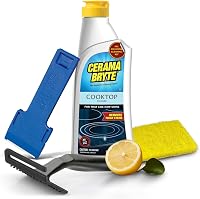
Wipe the glass after it cools with a non-abrasive cleaner. The Cerama Bryte kit includes a 10 oz cleaner, a scraper and pads, and the maker says it's safe on induction and other smooth cooktops.
Apply a quarter-sized amount to a cool surface, rub with the pad, buff and wipe. Use the scraper flat for burnt spots, never a metal scouring pad.
The cleaner contains no phosphates or silicone and is Made in the USA.
Let the surface cool before cleaning. A hot ring plus a cold wet cloth can crack the glass.
What should you check when the cooktop still won't start?
If the display stays dark, check the outlet and the breaker before blaming the cooktop. A portable unit needs a standard 120 volt, 15 amp outlet, so try another socket on the same circuit.
Then look at the controls. Many panels have a lock icon, and a locked panel ignores the power button.
A long press on the power button may be the startup step on some models. On a full range, a main cooktop switch may need pressing before any zone will respond.
If the unit is plugged into a known-good outlet and still won't respond, stop there. Contact the maker or a qualified technician rather than opening the case.
The short version of how to turn on induction stove top controls
Set a magnetic pan on the ring, press power, choose a level and start cooking. Most "won't turn on" cases trace back to a pan with a weak or missing magnetic base, or to a locked panel.
Once it's running, the panel is easy. For the full picture of how these burners work and which to buy, read our guide to portable induction cooktops.
If you're choosing a full unit, compare induction cooktops for home use or budget-friendly induction cooktops under 100 dollars. And before you commit to a model, see how much does induction stove top cost.
Frequently asked questions
Why does my induction cooktop beep and shut off?
It isn't finding a magnetic pan. Center a flat-bottomed pan that covers most of the ring, keep it within the size limit, and press power again.
Most units shut off after about 60 seconds with nothing detected, so this is a safety step, not a fault.
Can I use a pan that only partly covers the ring?
It may work, but the cooktop needs a strong magnetic base under the whole ring area to sense it reliably. A pan much smaller than the ring often triggers an error or heats unevenly.
Match the pan base to the ring size for the most consistent results.
Does an induction mat change how the stove starts?
No. The mat sits between the pan and the glass and still lets the magnetic field reach the pan.
The cooktop only needs a compatible pan on the ring.
The Lazy K mat is for induction cooktops only and is not a plate that makes ordinary pans work.
How do I lock the controls so a child can't turn the cooktop on?
Most induction cooktops have a lock or child-safety button in the control panel. Press and hold it as your manual says, and the panel stops responding to touches.
Open it the same way before cooking, and check the pan is off the surface when you lock it.
What should I do when the cooktop won't power on at all?
Check the plug, the outlet and the breaker first. Then look for a lock icon or a long-press startup step on the control panel.
If the display stays dark on a known-good outlet, stop and contact the maker or a qualified technician rather than opening the unit.