How to Open a Bosch Induction Cooktop
To open a Bosch induction cooktop, press and hold the lock (padlock or baby-safe) symbol for about 4 seconds until its light goes out or a short beep sounds. If the panel stays dark, check the mains breaker before anything else, because a hob without power shows no lock at all.
On this page (9 sections)
- Which Bosch cooktop opening method does your model use?
- Why won't my Bosch induction cooktop open?
- What should you check when the panel stays dark?
- How do you open the child lock after cleaning?
- Is the lock the same as the baby-safe key?
- How do you test the hob after opening?
- What if the lock key itself stops responding?
- Does the cooktop lock during cooking?
- How should you shop for a Bosch hob that is easier to control?
To open a Bosch induction cooktop, press and hold the lock (padlock or baby-safe) symbol for about 4 seconds until its light goes out or you hear a short beep. If the panel stays dark, check the mains breaker before anything else, because a hob without power shows no lock at all.
The open step is the same idea on nearly every Bosch hob: hold the key, wait for the confirmation, then test a zone with a pan on it. The rest of this guide covers what to do when the key does not respond, how to tell a lock from a fault, and how to keep the panel working.
Which Bosch cooktop opening method does your model use?
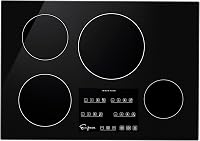
Most Bosch induction hobs open by holding the padlock key for about 4 seconds. The control lock sits on the touch panel, and a small light or padlock symbol shows while it is active.
Press the symbol with a clean, dry fingertip and keep it down until the light clears. A short beep confirms the change on most models, and some panels flash the lock icon once before turning it off.
If your hob has a baby-safe key with a picture of a child, treat it the same way: hold it until the indicator goes out. The padlock and the child lock do the same job, so you only need to find the symbol that is printed on your panel.
For the full control layout and cooking steps once the hob is free, see our guide to how to use a Bosch induction cooktop. Knowing the panel before you start saves time when a key seems unresponsive.
Why won't my Bosch induction cooktop open?
The usual cause is a fingertip that lifts too early or a panel that is damp. The lock needs a steady press of a few seconds, and a wet or greasy surface can break the touch contact.
Work through these causes in order before you assume the hob has failed:
- Short press. Hold the key longer than feels natural, until you hear the beep or see the light change.
- Damp panel. Wipe the glass dry around the key, then press again with a clean finger.
- Debris on the key. A film of grease or cleaner residue can stop the capacitive touch from registering.
- Lock key pressed twice. If you pressed the symbol while it was already releasing, the hob may have locked again.
- No power. A tripped breaker or a blown fuse in the circuit leaves the panel dark and looks like a stuck lock.
- Pan on the zone. A pan sitting over the controls area can confuse the touch surface on some layouts; move it away.
Most of these are quick fixes. If the panel is dark and dead, the problem is electrical rather than a lock.
What should you check when the panel stays dark?
A dark panel is a power problem, not a lock problem. A hob that has lost its supply cannot show a lock symbol, so there is nothing to release until power returns.
Check the circuit breaker that feeds the cooktop and reset it if it has tripped. Electric induction hobs run on a dedicated circuit, so look for a double-pole breaker rather than a small lighting circuit.
If the breaker holds but the hob stays dead, the appliance is not receiving power and needs a qualified electrician. Induction hobs carry high current, and the wiring behind the wall is not a DIY job.
The install itself can explain a hob that never powered up properly in the first place. Our walkthrough on how to install an induction cooktop covers the circuit, clearance, and connections to check.
If the control panel lights up but refuses all input, go back to the opening step rather than to the breaker.
How do you open the child lock after cleaning?
Clean the panel first, then open with a dry, steady press. Moisture is the most common reason a child lock seems stuck right after a wipe-down.
Use a non-abrasive cream on the glass and buff it dry. Avoid spraying cleaner straight onto the touch keys, because liquid can run into the panel edge and confuse the sensors.
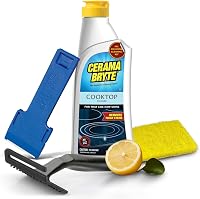
A dedicated cooktop cleaner keeps the glass clear without scratching the printed symbols. The Cerama Bryte kit pairs a non-abrasive cream with a pad and a scraper tool for burnt-on spots, and it is safe on glass and ceramic surfaces.
The Weiman kit is a similar three-piece set with a cream, scrubbing pad, and razor scraper for stubborn spills near the controls.
Whichever you use, finish with a dry buff and let the panel sit for a moment before you press the lock key. A damp panel is the one thing most likely to send you back to this page.
Is the lock the same as the baby-safe key?
Yes. The padlock key and the baby-safe key are the same control lock under two names.
Bosch panels print one or the other depending on the model and market.
Both block input from the touch surface, so a zone cannot be switched on or adjusted while the lock is active. Both release with a long press of the same symbol, usually around 4 seconds.
Some panels also lock by default after a period of inactivity, which can look like a fault if you walk back to a hob that won't respond. A steady press on the lock symbol clears it.
Treat the terms as one feature. If you find a padlock, a child, or a key symbol on the panel, hold it and wait for the light to change.
How do you test the hob after opening?
Put a pan on a zone, switch it on, and watch for a heat indicator. That confirms the panel is free and the zone responds before you commit to cooking.
Use an induction-ready pan with a magnetic base, such as cast iron or magnetic stainless steel. A pan with the wrong base will trigger the pan-detection warning, and that is not the same as a lock.
The Amazon Basics single burner is a good way to check whether your pans are induction-ready without touching the Bosch panel again, and it has its own child lock for small kitchens or backup use.
If the Bosch zone heats with a proper pan and the indicator moves, the opening worked and you can go back to normal cooking. If a zone still shows an error code, the lock was never the issue, and the code points to the fault.
What if the lock key itself stops responding?
A key that never responds, even dry and pressed firmly, points to the control board or panel. That is a service job, not a cleaning fix.
Before you call anyone, confirm the breaker is on and the hob has power, and try the lock press one more time with a clean finger. If other keys also fail while the hob is powered, the touch panel has a fault.
Do not open the hob to reach the electronics. Induction cooktops hold high voltage in the power stage, and even a switched-off unit can keep a charge.
A hob that is being swapped out for a different type has its own checklist, and our guide on whether you can replace a gas cooktop with induction covers the circuit and cutout differences. For a hob that is staying, book a Bosch-approved technician and quote the model number from the rating plate.
Does the cooktop lock during cooking?
Some Bosch hobs lock automatically after a set period of inactivity, and the touch panel may lock to stop accidental changes. Press and hold the lock key to release it and carry on.
If the lock comes back repeatedly, check for moisture or spills on the panel near the keys. Wipe and dry the area, then see whether the auto-lock behaves normally.
A lock that engages when nobody has touched the hob is usually the built-in control lock doing its job, not a failure. Treat it as a safety feature and release it with the same long press.
If a zone shuts down mid-cook instead of locking, that is a different issue. Check the pan size against the zone markings and move the pan to the centre before you assume a fault.
How should you shop for a Bosch hob that is easier to control?
Look for a panel with clearly marked lock and zone keys and a display that shows lock state. The easier the panel is to read, the less often a lock will send you searching.
A 30-inch induction cooktop is the common size for a Bosch kitchen, and our roundup of the best 30 inch induction cooktop compares control layouts alongside zone count and power.
Whatever hob you choose, keep the glass clean and dry around the keys. A daily wipe with a non-abrasive cleaner and a dry buff makes the lock key predictable and keeps the panel free of the moisture and grease that cause most stuck locks.
The short version of how to open a Bosch induction cooktop: find the padlock or child symbol, hold it for about 4 seconds until the light clears, and check the breaker if the panel is dark. If the key still ignores you, the panel needs a technician, not another press.
Frequently asked questions
Why does my Bosch cooktop lock again right after I release the key?
Your finger probably left the pad too early, or the panel picked up moisture across the key. Hold the lock symbol until the indicator clears and the hob beeps, then wipe the panel dry before you try again.
Does the pan still get hot while the cooktop is locked?
No. The lock stops the touch controls from responding, so you cannot start or change a zone while it is on.
If a pan was already heating, switch the hob off at the mains if the lock will not release.
What is the difference between the lock key and the child lock?
On most Bosch hobs the padlock key is the control lock, and the baby-safe or child lock is the same feature under a different name. Both block input until you hold the symbol for a few seconds, so treat them as one job.
Can I open the cooktop from the Home Connect app?
App control covers the hob only while the appliance is paired and connected, and the panel lock still has to be released on the glass in most setups. Use the touch key first, then check the app if your model supports remote settings.