How to Open a Miele Induction Cooktop
Press and hold the padlock key on the control panel until the lock indicator clears. On most Miele induction cooktops that's a child safety key on the main touch strip; a short press won't do it, so keep your finger down for a few seconds.
On this page (9 sections)
- Where is the lock key on a Miele induction cooktop?
- How to open Miele induction cooktop controls step by step
- Why won't my Miele induction cooktop open?
- Which Miele panel types change the opening step?
- How do you lock the cooktop again after cooking?
- How do you care for the panel so the lock key keeps working?
- Does a locked panel mean the cooktop is broken?
- When should you call Miele service?
- Final word on clearing a Miele lock
Press and hold the padlock key on the control panel until the lock indicator clears. On most Miele induction cooktops that's a child safety key on the main touch strip; a short press won't do it, so keep your finger down for a few seconds.
Learning how to open Miele induction cooktop panels takes about five seconds once you know which key to press. This guide walks through the padlock key, the panel types you'll meet on Miele models, and the fixes for a lock that won't clear.
Where is the lock key on a Miele induction cooktop?
The lock key sits on the touch control strip, usually as a padlock or child-safety symbol. It's grouped with the on/off key and the power and timer controls, not hidden in a menu.
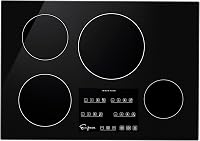
On many Miele induction cooktops the panel is a single horizontal strip across the front edge or the rear edge, depending on the model. A small padlock icon marks the key.
Some units label it as a child safety lock rather than a plain padlock.
Before you press anything, wipe the panel dry. A wet finger or a smear of cooking oil makes the touch keys unreliable.
Miele's touch controls respond to a flat, steady finger, so use the pad of your fingertip rather than a nail.
If your cooktop has a display screen rather than a printed strip, look for a lock icon in the corner of the screen or in the settings area. The same hold-and-wait action applies.
How to open Miele induction cooktop controls step by step
Hold the padlock key for several seconds until the lock light goes out. Here's the sequence that works on the common Miele layouts.
- Switch the cooktop on so the panel is active.
- Make sure no zone is running and the surface is dry.
- Find the padlock key on the touch strip.
- Press and hold it flat until you hear a tone or the light clears.
- Release and test a zone to confirm the panel responds.
If the first attempt fails, wait a moment and try again with a firmer press. Miele touch panels sometimes ignore a press when your hands are cold or the surface is slightly damp.
Don't hold two keys at once. Multi-key presses can trigger a different function, such as a timer or a power boost, instead of the lock.
Why won't my Miele induction cooktop open?
A wet panel, sticky residue or a child-safety lock that needs a longer hold are the usual culprits. Work through the simple causes before you call for service.
- Damp surface: liquid under your finger spreads the touch signal. Dry the panel and your hands.
- Greasy film: cooking oil builds a thin layer that blocks the sensors. Wipe with a glass-safe cleaner.
- Short press: a quick tap reads as an accidental touch. Hold longer.
- Active zone: some panels refuse lock changes while a zone runs. Turn everything off first.
- Stuck key: a key held down by a pan edge or a cloth can confuse the panel. Clear the strip.
If none of those help, cut the power at the breaker for about a minute and restore it. That resets the electronics without touching the settings.
What to do if the lock light stays on
Stop pressing and book service if the lock light stays lit after a power reset. Repeated pressing on a dead panel can wear the touch keys and won't fix a control fault.
Note the model number from the rating plate under the cooktop before you call. Miele's support team can talk you through the specific lock sequence for that model.
Which Miele panel types change the opening step?
Older Miele cooktops use a dedicated padlock key; newer ones may put the lock in a settings menu. The action is similar, but where you find it differs.
Cooktops with a printed touch strip
The classic layout has a row of symbols printed along the front edge. The padlock sits near the on/off key.
Hold it until the lock icon fades or a tone sounds. This is the most common arrangement on built-in Miele induction models.
Cooktops with a display or settings menu
Some newer Miele induction cooktops use a display with touch icons. The lock may sit in a settings or safety menu rather than as a printed key.
Open the menu, select the lock entry and confirm. If you can't find it, the manual for your model lists the exact path.
Cooktops paired with a hood or app
Miele cooktops that pair with a matching hood or a home app may show lock status in the app as well as on the panel. The panel key still works; the app is a shortcut, not a replacement.
Use the physical key when the app or Wi-Fi is down.
Whichever layout you have, keep the panel clean and dry. A build-up of grease around the keys is the most common reason a lock key stops responding.
How do you lock the cooktop again after cooking?
Hold the same padlock key until the lock light comes on. Locking is the same gesture as opening, just watch for the light to appear rather than clear.
Turn all zones off first. The lock stops the controls from changing, but it doesn't switch off a zone that's already heating.
Leaving a zone on while the panel is locked is a safety risk, not a convenience.
Some Miele cooktops lock automatically after a set period without input. If yours does, the panel may lock itself while you're still cooking, and you'll need to hold the key to make an adjustment.
That's normal behaviour, not a fault.
Keep the lock on whenever small children are in the kitchen. A locked panel stops curious fingers from turning on a zone or changing a setting.
How do you care for the panel so the lock key keeps working?
Wipe the touch strip after every cook and keep liquids away from the keys. A clean, dry panel is the simplest way to avoid a lock that won't clear.
Let the cooktop cool first, then wipe with a soft cloth and a glass-safe cleaner. Avoid spraying liquid directly at the touch strip; a damp cloth is safer.
Dry the surface fully before using the keys again.
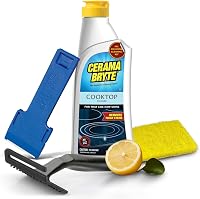
For everyday cleaning, a non-abrasive cream removes grease without scratching the glass. {{product B000MIWRTM | A non-abrasive cream and pad set for wiping grease off the touch strip without scratching it.}}
When marks bake onto the glass near the keys, a heavier cream helps. {{product B07LFKF7H6 | A cream cleaner with a scraper for burnt-on spots around the control panel.}}
A protective mat keeps the glass under the pans free of scratches. {{product B08D881NK5 | A silicone mat that sits under magnetic pans and keeps the glass clear of scrapes.}}
Does a locked panel mean the cooktop is broken?
No. A lock light is a safety feature working as designed, not a fault.
Most "won't turn on" calls about induction cooktops trace back to a child lock left on.
Check the lock light first when the panel seems dead. If the light is on, hold the padlock key.
If the light is off and the panel still won't respond, check the breaker and the power supply.
A panel that responds to some keys but not the padlock may have a worn touch area. In that case, stop pressing and get the control checked.
When should you call Miele service?
Call service when the lock light stays on after a power reset or the panel stops responding entirely. Don't keep pressing a panel that's clearly not registering.
Signs that point to a service visit include a lock light that won't clear, keys that respond intermittently, or an error code on the display. A control board fault needs a technician, not a household fix.
Before you call, write down the model number and note what you tried. That saves time on the phone.
If the cooktop is still under warranty, mention it when you book.
For a wider look at built-in induction models and what to expect from the category, see our roundup of the best 30 inch induction cooktop options.
Final word on clearing a Miele lock
Hold the padlock key until the light clears, and keep the panel dry and clean. That single gesture solves most Miele induction cooktop lock questions.
If the light stays on after a power reset, stop pressing and book service. A locked panel is a safety feature, and clearing how to open Miele induction cooktop controls comes down to the right key and a steady hold.
If you're fitting a new cooktop, our guide to how to install an induction cooktop covers the checks before you wire it in. And if you're weighing a switch from gas, read whether you can replace a gas cooktop with induction first.
Frequently asked questions
Why does my Miele cooktop lock itself?
A child safety or system lock is the usual reason. Some Miele cooktops also lock when the panel senses liquid or a wipe-down across the touch keys.
Clear the surface and try the padlock key again before assuming the appliance is faulty.
How long do I hold the padlock key to open?
Hold it for several seconds, until the lock light goes out or a tone sounds. A quick tap often registers as an accidental touch and leaves the lock on.
Keep your finger flat and steady rather than tapping repeatedly.
Can I open a Miele cooktop while a pan is on it?
Yes, but remove the pan first if the panel is wet or crowded. Heat and steam around the touch strip can confuse the sensors.
Let the surface cool a little, dry your hands and the panel, then hold the padlock key.
What if the lock won't clear at all?
Switch the cooktop off at the circuit breaker for a minute, then restore power and try again. If the lock light stays on and no key responds, stop pressing and book a Miele service visit rather than forcing the panel.
Does locking the cooktop turn the cooking zones off?
No. The lock stops the controls from changing settings; it doesn't cancel a zone that's already running.
Turn zones off before locking, and keep the padlock engaged whenever children are near the cooktop.