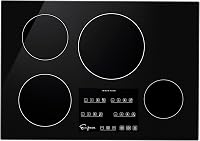
How to Open a Wolf Induction Cooktop
To open a Wolf induction cooktop, press and hold the lock or key symbol until the lock light goes out, usually about 3 seconds. If nothing responds, wipe the glass dry, check that no pan sits on the controls, and try the same press again.
On this page (10 sections)
- Why does a Wolf induction cooktop lock in the first place?
- How to open a Wolf induction cooktop step by step
- What should you check before you press anything?
- How do you open a Wolf cooktop after cleaning?
- Why won't the cooktop open when you hold the key?
- How do you lock a Wolf induction cooktop on purpose?
- What does the lock light and display tell you?
- How do you keep a Wolf cooktop from locking when you don't want it to?
- What should you do if the cooktop stays locked?
- When is a lock a sign of a bigger problem?
To open a Wolf induction cooktop, press and hold the lock or key symbol until the lock light goes out, usually about 3 seconds. If nothing responds, wipe the glass dry, check that no pan sits on the controls, and try the same press again.
That covers most locked panels. The rest of this guide walks through what to check first and how to keep the cooktop from locking when you don't want it to.
Why does a Wolf induction cooktop lock in the first place?
A Wolf induction cooktop locks to stop the touch keys from responding, so nothing starts by accident. The panel shows a lock symbol while the keys are disabled.
Wolf uses this for two reasons. The first is child safety: a small hand brushing the glass can't switch on a zone.
The second is cleaning: a locked panel lets you wipe the glass without beeping or changing a setting.
A lock is not a fault. If the cooktop won't start and a key or padlock symbol shows, the lock is almost always the reason.
The panel can also come back locked after a power blip, because the cooktop may return with the lock engaged as a safety default. The same press and hold releases it.
How to open a Wolf induction cooktop step by step
Hold the lock key until the light clears, and keep your finger still while you do it. The full sequence is short, but order matters on a touch panel.
- Turn off every zone that is still cooking.
- Wipe the glass around the controls and dry it.
- Move pans and cloths away from the key strip.
- Press and hold the lock or key symbol for about 3 seconds.
- Wait for the lock light to go out or the display to change.
- Touch a zone key to confirm the cooktop responds.
Don't tap the key quickly several times. A touch panel reads a short tap as a press and release, not as a hold, so rapid taps can leave the lock on.
Rest your fingertip flat over the symbol and count to three.
If your cooktop has separate lock and pause features, release both. Holding the wrong key can leave the panel still unresponsive.
What should you check before you press anything?
Check the glass first, because moisture and cookware are the two most common reasons an open press fails. A wet panel or a pan over the keys can block the touch sensors.
Dry the control area with a soft cloth. Water, cleaning spray and grease all change how the capacitive keys read your finger.
Next, clear the area above the controls. A pan handle or a resting lid can sit on a key without you noticing.
Finally, check your hands. Wet or greasy fingers don't register well on glass.
Dry them and press with the flat of your fingertip rather than a nail.
How do you open a Wolf cooktop after cleaning?
Open it the same way you locked it: press and hold the lock key until the light goes out, once the glass is dry. Cleaning is the most common time for a lock to surprise people.
Wipe the panel last so you don't lock it again with damp fingers. Use a cleaner made for glass and ceramic cooktops, then buff the surface dry.
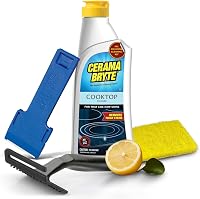
The Cerama Bryte kit includes a 10 oz cleaner, a scraper, a grip pad tool and a cleaning pad, and the formula is non-abrasive for glass and induction surfaces. Use a quarter-sized amount on a cool cooktop and buff with a dry paper towel or microfiber cloth.
Keep the cleaner off the key symbols as you work, and dry them fully before you touch the lock.
Why won't the cooktop open when you hold the key?
If the press does nothing, the panel is probably not reading your touch, or the cooktop is in a state that overrides the key. Work through the likely causes before you assume a repair.
- Wet or dirty glass: dry the panel and try again.
- A pan on the keys: move cookware off the control strip.
- Rapid tapping: hold the key steady for the full count.
- A zone still on: turn every burner off first.
- A power interruption: reset the cooktop as the use and care guide describes.
- A child lock set elsewhere: some Wolf models pair the lock with a separate control setting.
Moisture is the cause worth checking twice. A cooktop that was just cleaned often locks when a damp cloth crosses the keys.
Let the glass air dry for a minute, then hold the lock key. If the lock light stays on after all of these, follow the model's reset steps, then contact Wolf support.
How do you lock a Wolf induction cooktop on purpose?
Lock it the same way you release it: hold the lock or key symbol for about 3 seconds, until the lock light comes on. Do it after every zone is off and the glass is cool.
Lock the panel when small children are in the kitchen, or when you're cleaning the glass and don't want the keys to react. Don't lock a cooktop that's still cooking, because the lock disables the controls and you can't stop a zone from the panel.
A mat can help protect the glass from scratches and keep pans from sliding, which reduces the chance of a pan brushing the keys. The Lazy K mat is silicone and fiberglass and is made only for induction cooktops.
It's rated to 480°F and is dishwasher safe. Use it only with induction-compatible cookware that has a flat, strongly magnetic base.
A mat with weak cookware can slow heating or stop the zone from sensing the pan.
What does the lock light and display tell you?
The display is your best clue. A steady lock symbol means the keys are disabled, while a blinking symbol or a code points to something else.
On most Wolf models, the lock shows as a padlock or key icon near the controls. When it clears, the zone displays return to normal.
If the panel shows a fault code instead, the lock isn't the problem.
A blinking zone light with no lock symbol usually means the zone can't find a pan. That's a cookware issue, not a lock.
Check that the pan base is flat and magnetic before you press anything.
How do you keep a Wolf cooktop from locking when you don't want it to?
The trick is to avoid touching the lock key by accident and keep the glass dry. Most unwanted locks come from cleaning and from hands resting on the panel.
- Wipe the keys last, and dry them fully.
- Keep pan handles turned away from the control strip.
- Don't set lids, spoons or cloths on the key area.
- Press keys briefly when you cook, not with a resting hand.
A cleaner made for glass and ceramic surfaces helps here too.
The Weiman kit includes a 10 oz cleaning cream, three non-scratch scrubbing pads and a razor scraper for burnt-on spots. It's non-abrasive and safe for daily use on induction, glass and ceramic ranges.
Buff it dry with a paper towel or microfiber cloth so no residue sits on the touch keys.
What should you do if the cooktop stays locked?
If the panel stays locked after drying and a power reset, stop and get model-specific help. A persistent lock can point to a control board or sensor problem that needs a technician.
Write down the model number from the cooktop frame and any code on the display. That saves time when you contact Wolf support or book service.
Don't open the cooktop yourself.
A 30-inch built-in model is the common size in many kitchens, so replacement and service parts are easy to match. Our roundup of the best 30 inch induction cooktop shows what current models offer if you're weighing a repair against a new unit.
When is a lock a sign of a bigger problem?
A lock that clears with a press is normal. A lock that returns on its own or won't clear is the warning sign, and so is a panel that reacts to keys you didn't touch.
Repeated self-locking usually means moisture inside the control area or a failing touch sensor. Clean and dry first, then watch for a pattern.
If the cooktop locks during cooking with no key press, stop using it and book service. Heat and steam from a pot too close to the controls can trigger false touches.
Installation problems can show up the same way. If your cooktop is new and locks oddly, review how to install induction cooktop steps to check clearance and ventilation.
Replacing a gas top is a different job, covered in can you replace gas cooktop with induction.
Frequently asked questions
Why does my Wolf induction cooktop keep locking itself?
The control lock often engages when you hold a key too long during cleaning or when moisture sits on the glass. Wipe and dry the panel, keep your fingers flat and brief on the keys, and lock the cooktop only when you actually want it locked.
Does the lock stop the whole cooktop or only the controls?
On a Wolf induction cooktop the lock disables the touch keys, so the cooktop won't start or change settings while it's on. It doesn't replace shutting off a zone, so turn off every burner before you lock the panel for cleaning or child safety.
Can a pan open or lock the cooktop by mistake?
A pan resting over the key symbols can press them or confuse the touch sensors. Keep cookware clear of the control strip, and remove pans from the panel area when the cooktop beeps or a key seems stuck.
What should I do if the open press does nothing?
Dry the glass completely, move any pan or cloth off the controls, and try the press and hold once more. If the lock light stays on after that, follow the power reset steps in the Wolf use and care guide for your model, then contact Wolf support.