Induction Cooktop Features Worth Paying For
The induction cooktop features worth paying for are controls, a timer, and safety options that fit your routine. Choose presets and displays only when they make your regular cooking easier.
On this page (6 sections)
The induction cooktop features worth paying for are the ones that make your regular meals easier to control: usable temperature or power settings, a timer, and safety options that suit your household. Presets and display extras are helpful when they match tasks you repeat, but more buttons alone don't make a cooktop a better fit.
Start with your cooking routine. If you simmer sauces or warm food gently, compare temperature settings and how small each adjustment is.
If you mainly boil, fry, or reheat, straightforward power levels may be enough. A timer is useful for either style when you need to track a cooking interval.
Induction transfers heat to compatible cookware, so the pan remains part of the setup. If you want a quick explanation of the cooking method, read how induction cooktops work.
Which induction cooktop features matter most?
Prioritize controls, timing, safety, and cookware fit before extra modes. A feature earns its place when it solves a task you do often or prevents a predictable operating mistake.
For a single countertop burner, also think about where it will sit, how often you will move it, and whether its controls will be comfortable to use. The right feature set for a temporary extra burner may differ from what you want as your main cooking surface.
Are induction cooktop temperature settings worth paying for?
Temperature settings are useful when you want finer adjustments than a simple low-to-high control provides. They can suit gentle warming, simmering, or other cooking where you want to make small changes as the food cooks.
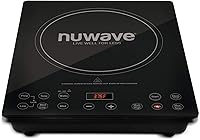
The Nuwave Precision 10.25-Inch Induction Cooktop has 81 temperature settings from 100°F to 500°F in 5°F steps, along with 600-, 900-, and 1400-watt settings. You can adjust the temperature or cooking time while cooking, which is useful when a recipe needs a mid-course correction.
This is a good fit if you expect to use those smaller steps and want to fine-tune heat without starting over. Skip the extra range if you mostly use a few familiar settings.
The number of steps matters less than whether the controls are easy to read and adjust; for a closer look at these control types, see induction cooktop temperature control.
Do power levels matter more than presets?
Power levels matter when you want direct control over output. More levels can give you smaller steps between low and high, but the pan, amount of food, and recipe still shape the result.
The Duxtop E210C2 Portable Induction Cooktop offers 15 power levels from 200 to 1800 watts and 15 temperature settings from 140°F to 460°F. Its lock helps keep cooking and timer settings from changing by accident.
Choose it if you want both control modes and a lock on a portable burner. It may be more choice than you need if you prefer one simple heat scale and rarely change settings; compare other countertop options in this portable induction cooktop buying guide.
When is a timer useful?
A timer is useful when you want to track cooking intervals without relying on a separate clock. Check its maximum duration and what the cooktop does when the countdown ends, since those details affect whether the timer fits your cooking style.
The Duxtop E210C2 timer runs for up to 170 minutes, while the Duxtop P961LS Professional Induction Cooktop has a countdown timer that runs up to 10 hours. The P961LS suits longer timed cooking, while a shorter timer can be sufficient for everyday tasks such as boiling or reheating.
Choose the P961LS if a long countdown and a readable control panel matter to you. Skip the longer timer if your cooking rarely needs extended timing, and check the manual so you know whether the timer stops heat or only signals that time is up.
A timer does not replace checking food, especially when you are learning a recipe.
Which safety features are worth looking for?
Choose safety features for the risks you want to manage. Cookware detection can stop operation without a suitable pan, a lock can prevent accidental control changes, and a residual heat indicator can remind you that the surface remains warm.
The Duxtop E210C2 detects missing or incompatible cookware and shuts off after 60 seconds in those cases. The AAOBOSI 1800W Portable Induction Cooktop has a child safety lock and a residual heat indicator.
The AAOBOSI is a strong fit when you want those two reminders alongside everyday cooking presets. Choose the E210C2 if cookware detection and a control lock are higher priorities.
Neither option makes hot cookware safe to touch, so keep children clear of the burner while it is operating and cooling.
Are cooking presets worth paying for?
Presets are useful when they match tasks you repeat. They can simplify setup for a familiar cooking mode, but they don't account for every pan, portion, or recipe.
The AAOBOSI has Boil, Hot Pot, Stew, and Keep Warm presets, plus 20 power levels and 20 temperature levels. That combination suits a cook who wants quick starting points but still wants to adjust the heat manually.
The Nuwave instead emphasizes a wide range of temperature steps and on-the-fly changes. Choose it if you expect to fine-tune settings; consider the AAOBOSI if its four presets match meals you make often.
Skip preset modes you won't use, since a simpler panel may be easier if your routine is mostly boiling, frying, or reheating.
Is an easy-clean surface worth paying for?
A smooth surface is practical because it can be wiped after it cools. Induction heats compatible cookware directly, but heat from the pan can still leave the glass surface warm after cooking.
The Duxtop E210C2 has a glass cooking surface, the AAOBOSI uses ceramic glass, and the Duxtop P961LS has a stainless steel body. These materials are worth comparing as part of the cooktop's overall care routine, not as a reason to ignore the manual.
Let the cooktop cool before wiping it with a damp towel, and use cleaning methods meant for its surface. Avoid rough pads or tools that can scratch glass; the guide to cleaning an induction cooktop without scratching it has practical care steps.
If you want a portable burner for a small counter, also compare the options in portable induction cooktops for countertops.
A common mistake is to assume induction leaves no heat on the surface because it heats the pan. The pan can transfer heat to the glass, so give it time to cool before cleaning or putting it away.
Which display and control features help during cooking?
A readable display and clear controls help you check settings from your normal cooking position. Touch controls are easy to wipe, but the display should still be easy to see and the buttons should make sense before you start cooking.
The Duxtop P961LS has a sensor touch panel and an LCD screen on an angled control panel, which may help if you want to read the settings from farther away. The Duxtop E210C2 uses a sensor touch panel with an LED display.
Choose the P961LS if its angled screen and long timer suit your workspace. Choose the E210C2 if you want a simpler display and its two control modes are enough.
If possible, consider where the controls will face and whether you will need to reach across a hot pan to use them.
Don't pay extra for a display with more information than you need. You should be able to set heat, check the timer, and understand any warning or error message without interrupting your cooking.
What should you check before paying more?
Check cookware compatibility, electrical setup, and counter space before choosing extra features. Settings have little value if your cookware won't work or the cooktop doesn't fit the place you plan to use it.
Induction needs cookware with a magnetic base. Hold a magnet to the bottom of a pan; if it sticks firmly, the pan should be compatible, but follow the cooktop manual for any minimum pan size.
The Duxtop models use a standard 120-volt, 15-amp outlet, and the AAOBOSI is an 1800-watt cooktop. Before setting up any countertop burner, check the manual and the electrical requirements for your model, give it a stable, clear surface, and keep its air openings unobstructed.
A frequent setup mistake is to place a small or nonmagnetic pan on the cooking zone and assume the burner is faulty when it doesn't operate. Check the pan base and size first, and center compatible cookware on the zone.
For a broader comparison of size and use, see induction cooktop types, power, and picks.
Which induction cooktop features are worth paying for?
Choose fine temperature steps if you often adjust heat for simmering or warming, and choose a long timer if your meals need extended timing. Pick safety locks or cookware detection when those features address a concern in your household.
The Nuwave suits cooks who want many temperature adjustments and the option to change settings while cooking. The Duxtop P961LS suits people who value a long countdown timer and angled LCD display; skip it if you don't need extended timing or a larger control panel.
The AAOBOSI is a good choice when its four presets, child lock, and residual heat indicator match your routine. Choose the Duxtop E210C2 if you want both power and temperature modes with a safety lock.
Start with the features you will use every week, then compare the full range of induction cooktop types and power options.
Frequently asked questions
Which induction cooktop features are most useful?
The most useful features for many kitchens are clear temperature or power controls, a timer, and safety options that fit your household. A lock can prevent accidental setting changes, while a residual heat indicator reminds you the surface may still be hot.
Choose functions you expect to use often.
Is temperature control better than power control on an induction cooktop?
Neither is always better. Power controls adjust output, while temperature controls let you select a target temperature.
Temperature steps can help when you want finer adjustments for warming or simmering, while power levels may feel more direct for routine cooking.
Your pan and food still affect the result.
Do induction cooktops need a timer?
A timer helps track cooking time, but models differ in duration and what happens when time runs out. Check whether yours shuts off the burner or only alerts you, and choose a longer timer if your meals need it.
Continue to monitor food and follow the cooktop's instructions.
What safety feature should I look for on an induction cooktop?
Look for cookware detection, a safety lock, overheat protection, or a residual heat indicator based on your needs. These features serve different purposes and don't replace safe habits.
Use compatible cookware, keep children away while cooking, and wait for the surface to cool before cleaning.